Zonebit
个人的奋斗还是历史的进程?
实现一个类似vue的数据双向绑定例子
参考了面试题:你能写一个Vue的双向数据绑定吗?修改了部分代码,按照自己的理解写了一下实现思路
核心的原理
- 从
view到model的更新通过表单元素的事件回调完成 - 从
model到view的更新利用defineProperty方法重写set属性,在set引用的方法里面触发watcher对象的update操作,watcher保存了我们自己的vue实例,data引用,实例挂载的元素,以及需要操作的元素属性
首先,我们的双向绑定是MVVM的模式
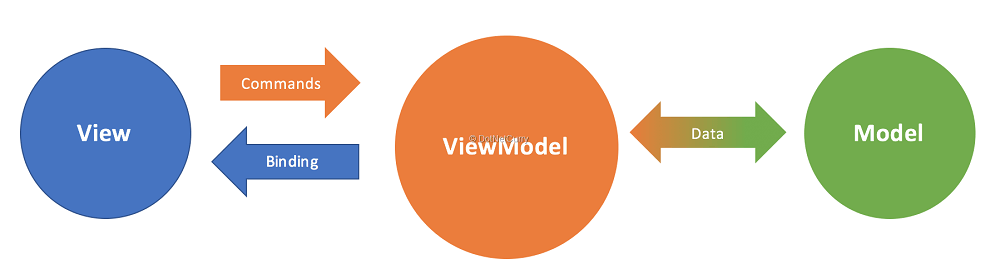
- 为了便于理解,代码中出现的_compile方法、Watcher类和_observe方法可以简单对应到view层,viewModel层和model层
- 文本节点的数据绑定没有使用mustache的模板语法,而是使用了v-bind属性绑定的textContent
例子涉及的数据流动
div.textContent <= app.$data.count input.value <=> app.$data.count
整体代码如下
<!DOCTYPE html>
<html lang="en">

<head>
  <meta charset="UTF-8">
  <meta name="viewport" content="width=device-width, initial-scale=1.0">
  <meta http-equiv="X-UA-Compatible" content="ie=edge">
  <title>模拟vue双向绑定</title>
</head>

<body>
  <div id="app">
    <input type="text" v-model="count">
    <button v-on:click="increment">喜加一</button>
    <div v-bind="count"></div>
  </div>
  <script>
    window.onload = function () {
      var app = new myVue({
        el: '#app',
        data: {
          count: 0
        },
        methods: {
          increment() {
            this.count += 1
          }
        }
      })
    }

    function myVue(options) {
      this.$options = options;
      this.$el = document.querySelector(options.el);
      this.$data = options.data;
      this.$methods = options.methods;

      this._binding = {};
      this._observe(this.$data);
      this._compile(this.$el);
    }

    myVue.prototype = {
      _observe(obj) {
        for (key in obj) {
          if (obj.hasOwnProperty(key)) {
            var value = obj[key]
            var data = this._binding[key] = {
              _directives: []
            }
            Object.defineProperty(obj, key, {
              enumerable: true,
              configurable: true,
              get() {
                return value
              },
              set(newv) {
                if (newv !== value) {
                  value = newv
                  data._directives.forEach(function (watcher) {
                    watcher.updateView()
                  })
                }
              }
            })
          }
        }
      },
      _compile(root) {
        var vm = this
        var elmts = root.children
        Array.prototype.forEach.call(elmts, function (ele) {
          if (ele.childElementCount) {
            vm._compile(ele)
          }
          if (ele.hasAttribute('v-bind')) {
            var dataName = ele.getAttribute('v-bind')
            vm._binding[dataName]._directives.push(new Watcher(vm, dataName, ele, 'textContent'))//modal=>view
          }
          if (ele.hasAttribute('v-on:click')) {
            var methodName = ele.getAttribute('v-on:click')
            ele.onclick = vm.$methods[methodName].bind(vm.$data)
          }
          if (ele.hasAttribute('v-model') && ele.tagName == 'INPUT') {
            var dataName = ele.getAttribute('v-model')
            vm._binding[dataName]._directives.push(new Watcher(vm, dataName, ele, 'value'))//modal=>view
            ele.addEventListener('change', function (evt) {
              vm.$data[dataName] = ele.value//view=>model
            })
          }
        });
      }
    }

    function Watcher(vm, dataName, ele, attr) {
      this.vm = vm
      this.dataName = dataName
      this.ele = ele
      this.attr = attr

      this.updateView();
    }

    Watcher.prototype.updateView = function () {
      this.ele[this.attr] = this.vm.$data[this.dataName];
    }
  </script>
</body>

</html>
碰到的一个小坑
defineProperty的第三个参数,一个选项对象,里面可以配置value、writable、enumerable、configerable、get、set这几个属性,当我们设置了get、set方法的时候,就无法设置value和writable属性,否则会报错
需要改进的地方
-
本身是实现了一个点击按钮+1的方法,如果手动输入字符就会变成一个拼字符串操作,输入数字也是不行的,所以需要加入输入校验
-
实现mustache模板语法